


Field Guide
Content analytics and entity SEO
Understand what your content is doing, and make sure Google understands it too.
Field Guide reads every article as you publish it. It adds authors, categories, dates, and topics to your analytics, and uses the same topics to organize your site for Google. Instead of leaving you to dig through reports, it tells you what to write more of, which coverage to bring together, which titles to rewrite, and which subjects are reaching diminishing returns.
For editorial and communications directors who get asked “what’s working?”
A 30-minute walkthrough of your own site’s numbers and recommendations.
Trusted by editorial teams at


















Your analytics can’t answer the questions your editors ask.
Which authors drew the most search traffic this quarter? Which subjects hold readers longest? Did the redesign hurt the archive? Google Analytics counts visits to pages, but it doesn’t know who wrote each piece or what it covers. So the answers live in a spreadsheet someone rebuilds every time leadership asks.
Newsroom tools watch today’s traffic live. Keyword tools suggest what to write next. None of them shows how your existing work performs by author, category, or subject.
Combine your data into a single source of truth.
Google Analytics records readership. Google Search Console records search performance. Your CMS holds the authors, categories, and publication dates. Field Guide brings them together for each article, so you can quickly sort and filter your content by author, category, or publication date.
How much traffic did John Q. Analyst’s analysis receive in the last 90 days?
Compare an author’s work, a category, or everything published in a particular period without switching between reports.
What do I connect?
Your publishing system, Google Analytics, and Google Search Console. Field Guide matches the publishing details to the analytics and search data for each page. You can also connect Google Ads for campaign reporting.
How far back can I look?
You can use the history available from your connected accounts. Google Analytics and Search Console have different history limits; Search Console provides up to 16 months. Field Guide applies the publishing details from your site to the available history.
Add topics to understand demand, traffic, and engagement.
Field Guide analyzes your articles and adds new metadata: the people, places, organizations, and ideas they cover. Topics bring related coverage together across authors and categories, so you can see which subjects people search for, which draw readers, and which hold their attention.
Plan coverage with readership and search demand together.
For each topic, compare search demand with the traffic your articles earn and the time readers spend with them. See how much you have published, which coverage is working, and where a follow-up could meet demand.
Compare demand and readership across your topics.
In this example, School funding earns 2,400 views per article. Search demand is level from September to October, while readership returns in bursts and rises again in October. Your editor can use that evidence to weigh additional coverage against other priorities.
How is search demand different from Search Console data?
Search Console shows how your site appears in Google search. Search demand estimates how often people search for a topic across Google each month, including searches that never reach your site. It helps you assess demand beyond the audience you already attract.
What do the trend labels mean?
Each label describes a pattern in readership, search demand, or the results of additional coverage:
-
Heating up
Searches and readership are both rising.
-
Breaking out
Readership is growing much faster than other topics, without a matching jump in searches.
-
Untapped demand
Searches are rising, but your coverage is not yet drawing more readers.
-
Holding up
Searches are falling, but readership is holding steady.
-
Diminishing returns
Newer articles receive fewer views than earlier coverage.
-
Losing ground
Readership is falling while most other topics are growing.
-
Cooling
Searches and readership are both falling.
Does Field Guide score topics or decide what we publish?
Field Guide shows counts, estimates, comparisons, and the reasons behind its suggestions. It does not reduce a subject to a 0–100 score. Your editors weigh the evidence alongside your mission, news judgment, and resources.
Get more from what you’ve already published.
Find articles worth sharing again, topic pages that need work, and titles worth reviewing. Each recommendation shows the task and the numbers behind it, so your editors can decide what to do next.
An article worth promoting, and a follow-up worth assigning
The first article holds readers for more than three times the site average, suggesting it is worth sharing again. The second draws more readers in its second and third weeks than in its first, giving your editor a reason to consider a follow-up.
What kinds of recommendations will I get?
Recommendations are grouped by the work involved:
-
Build topic pages: organize scattered coverage and improve topic pages that readers rarely reach.
-
Promote: give articles with strong reading time another chance to reach people.
-
Review headlines: check titles and openings against search wording and reader behavior.
-
Shorten titles: review long SEO titles that may be cut off in search results.
-
Write more: consider follow-ups where readership or search demand is growing.
Are the recommendations written by AI?
No. Fixed rules identify opportunities in your data, and templates explain the findings using your numbers. Your team decides which suggestions fit its editorial priorities.
When does the data update?
Data refreshes each morning. Recommendations run daily, weekly, or monthly, depending on how often you publish. Field Guide is built for editorial planning rather than live newsroom monitoring.
Add those topics to your website so Google understands your work.
Review the topics Google’s language analysis finds in your content and correct what it misses or gets wrong. Use the completed topics in schema data and internal links, and bring frequently searched topics into your titles and meta descriptions.
Add the topics Google’s language analysis misses.
Field Guide starts with Google’s natural language processing, then uses AI to add missing topics and remove incorrect matches. Your editors can see the results, correct a match, or add a topic themselves.
From broad labels to the people and issues in the story
Google NLP Baseline
About
- Education
- Chicago
- American Federation of Teachers
- Illinois Federation of Teachers
Mentions
- Illinois
- Union
- Google NLP
- AI added
- Editor added
Field Guide Schema
About
- Chicago Teachers Union
- Brandon Johnson
- Stacy Davis Gates
- Collective Bargaining
Mentions
- Public Schools
- Education Policy
- Education
- Chicago
- American Federation of Teachers
- Illinois Federation of Teachers
- Illinois
In this example, editors add Chicago Teachers Union, Brandon Johnson, and Stacy Davis Gates. AI adds Collective Bargaining, Public Schools, and Education Policy. Field Guide uses the completed topics in your analytics and in the structured data, topic pages, and internal links on your site.
Can editors change the topics on an individual post?
Yes. In the WordPress editor, review the detected topics, change their classification, choose a Main Topic, or add a topic by searching Google’s Knowledge Graph.
What if we regularly cover a name the analysis misses?
Add officials, agencies, bills, or other recurring subjects to your watchlist. Field Guide then looks for them across your posts, so editors do not have to add the same missing topic article by article.
Can we hide a topic across the whole site?
Yes. Hide an incorrect or irrelevant topic once to exclude it across your site. This gives editors a way to resolve a repeated mismatch without editing every affected article.
Check one of your articles
Paste a public article URL to see the topics Google’s language analysis finds, and the ones Field Guide adds. No signup required.
- Fetching your article
- Google NLP: finding entities
- Field Guide: finding missing topics
- Sorting About and Mentions
Put those topics to work across your site.
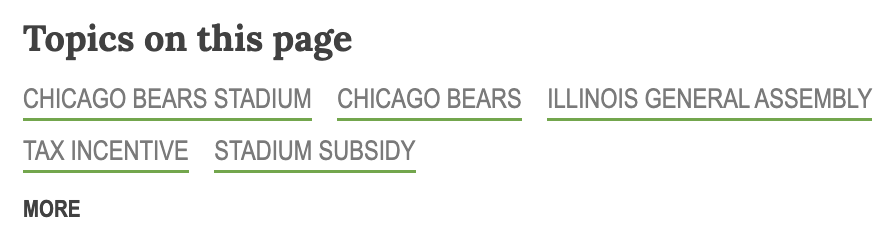
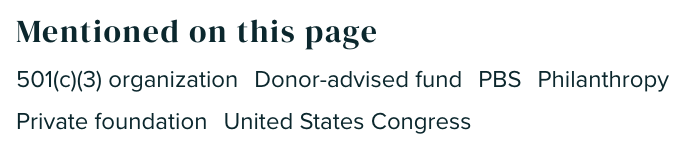
Internal links Connect each article to the rest of your coverage.
Field Guide adds topic links to your articles and connects them to pages of related coverage. Readers and search engines can follow those links through your archive. The links follow your site’s design.

Do editors have to add the links to every article?
Field Guide creates the topic links from the topics attached to the article. Editors can review those topics and hide irrelevant ones using the controls described above.
Does this replace our existing categories?
No. Categories remain part of your publishing structure. Topic pages add another way to collect related work across authors, categories, and publication dates.
How do the recommendations connect to topic pages?
Build topic pages recommendations identify scattered coverage and topic pages that readers rarely reach. Your team can use that evidence to decide which pages need a clearer introduction or better links.
Schema Tell Google which topics an article covers.
Field Guide writes your confirmed topics into the page’s HTML as structured data. Knowledge Graph identifiers and reference links distinguish the people, organizations, and subjects your article covers. Search engines and AI systems can read this information without running JavaScript.
{
  "@context": "https://schema.org",
  "@type": "Article",
  "mainEntity": {
    "@type": ["Thing", "Organization"],
    "@id": "kg:/g/07t65",
    "name": "United Nations",
    "url": "https://www.un.org/",
    "sameAs": [
      "https://wikidata.org/wiki/Q1065",
      "https://twitter.com/UN"
    ],
    "location": {
      "@type": "Country",
      "name": "United States"
    }
  }
}What does schema add to the words on the page?
It states which entities the article concerns in a format other systems can parse. A name, identifier, and reference links help distinguish one person or organization from another with a similar name.
Can we keep Yoast or Rank Math?
Yes. Field Guide works alongside Yoast and Rank Math. They provide your existing SEO markup; Field Guide adds the article’s topics.
Do readers see this code?
The structured data sits in the page’s HTML. Readers see the article and its topic links; the labeled excerpt above shows what other systems can read from the code.
Titles and descriptions Include the topics people search for.
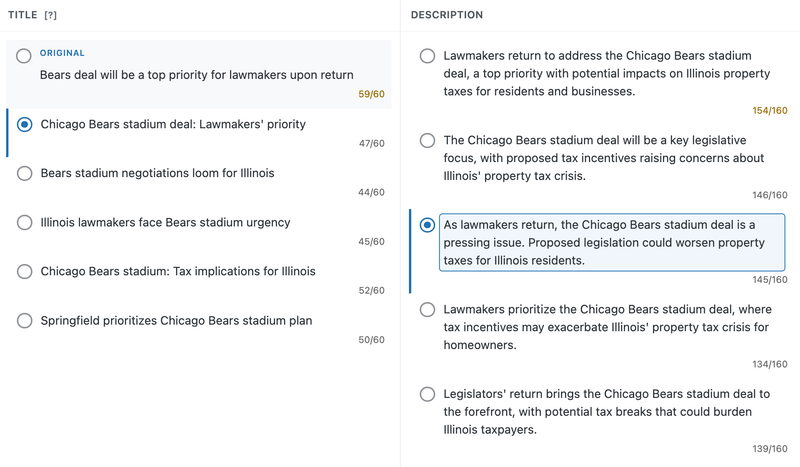
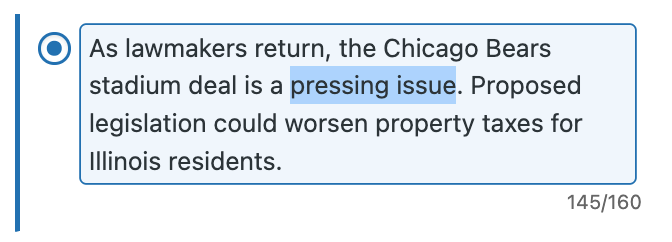
Compare traffic potential, ranking difficulty, and your existing coverage to choose a focus topic. Field Guide then suggests search titles and meta descriptions that include it. Your editors choose and edit the wording in WordPress.
Choose a focus topic

Color = how hard the topic is to rank for.
Edit the title and description
What does traffic potential measure?
Ahrefs estimates the monthly organic traffic received by the page ranking first for a keyword, across all the keywords that page ranks for. Field Guide uses U.S. keyword data. This is broader than the number of searches for one phrase, and it is an estimate of the opportunity, not a forecast for your article.
What do the badge colors mean?
The color represents Ahrefs’ keyword difficulty estimate: green for easy, yellow for medium, orange for hard, and red for very hard. Use it to compare topics; it does not determine whether your article will rank.
What does the article count tell me?
It counts the articles on your site filed under that topic. A larger count shows where you already have a body of coverage to draw on. It does not measure the quality of those articles or their search performance.
Does this change the headline on our site?
No. The tool updates the article’s SEO title and meta description. The headline and body on your site stay as written. Your original headline is also available as an SEO title option.
When are my choices saved?
Generating options leaves the choice to you. Once you select both a title and description within the tool’s limits, they save automatically. On a published article, this updates its SEO metadata without a separate publishing step.
Will Google show exactly what we choose?
Google may use a different title or snippet based on the page and the search. The tool’s 60-character title and 160-character description targets help keep your wording concise; they are not fixed Google display limits.
Two more ways to use the same data.
Ask your AI assistant about your site.
Connect your AI assistant directly to Field Guide’s data through our MCP server. Ask about your traffic, topics, and articles in plain English.

See which ads bring readers to your work.
For a connected Google Ads or Ad Grant account, Field Guide puts ad previews and performance in the same dashboard. Filter by campaign, compare impressions, clicks, and cost, and inspect the ads behind the numbers.
Your ads and their performance

Want us to manage the account?
Trail Marker is our Google Ad Grant management service. We create ads, manage campaigns, and review the account while your team keeps publishing. Field Guide gives you the reporting view; Trail Marker provides the management.
Explore Trail MarkerDoes Field Guide include Ad Grant management?
No. Trail Marker is a separate service. Field Guide provides analytics and topic data; buying it does not enroll you in account management.
Which ads and metrics can I see?
The dashboard supports responsive search ads, Dynamic Search Ads, and Performance Max asset groups when those formats run in the connected account. You can inspect ad previews and performance, including impressions, clicks, click-through rate, cost, and cost per click. Conversion figures depend on the goals configured in Google Ads.
Do I need Field Guide to use Trail Marker?
Ad creation, account review, and bid management can run on an eligible account without Field Guide. The topic campaigns we build for Dynamic Search Ads and Performance Max use Field Guide’s topic data.
Show the board where your work appeared.
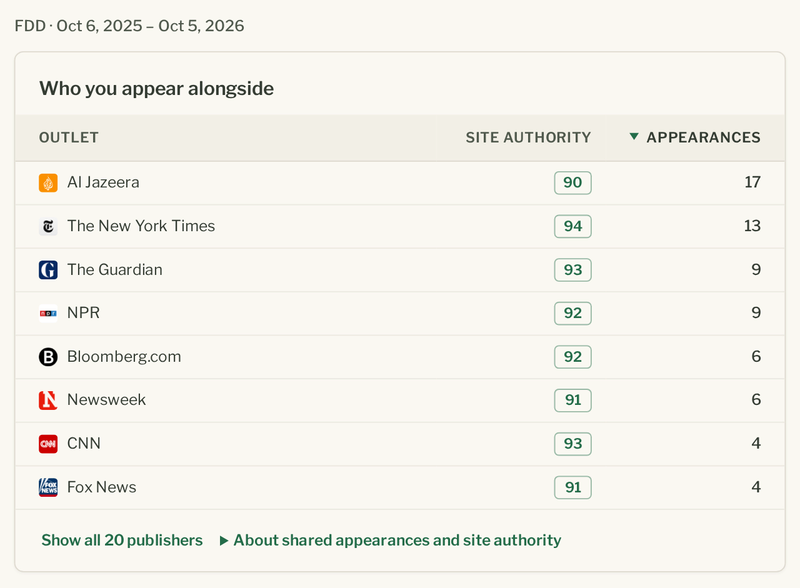
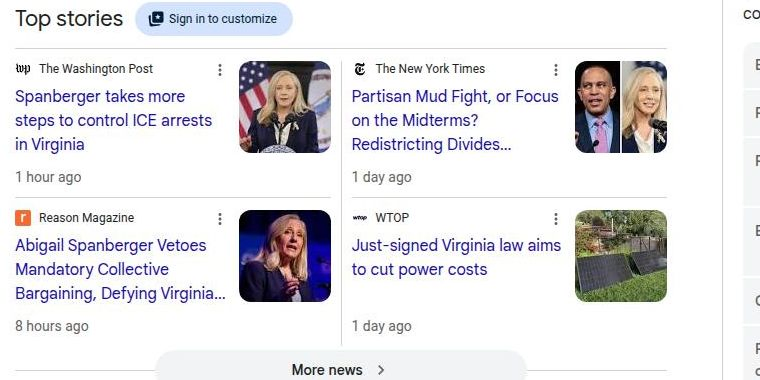
See where your articles appeared in Google’s Top Stories, and which outlets appeared alongside them. Field Guide keeps the captured result, search query, position, and time observed together.
The report and the captured result
What does the Top Stories report cover?
Appearances recorded for the searches we monitor, within your chosen dates. Filter by search, country, or publisher, and open a record to inspect the captured result. The report shows observed appearances rather than every time Google displayed your work.
Can I see who links to my articles?
Yes. The Backlinks report groups referring websites by the articles they link to, with link counts, site authority, and dates observed.
Can I see traffic from AI assistants?
Yes. Connected analytics identifies visits referred by tools such as ChatGPT, Claude, and Gemini. Explore that traffic by topic and author. These reports measure visits to your site; they do not monitor every answer or citation generated by an AI assistant.
What the topics do on the site.

49K → 146K
Average monthly Google Discover clicks
Before and after activating Field Guide.

22 → 113
Recorded Google Top Stories appearances
Seven months before activation compared with seven months after.
How were these results measured?
Discover clicks come from Google Search Console. Top Stories counts come from SearchClippings’ recorded appearances for monitored searches. Repeat checks of an existing appearance update its record without adding another appearance. The case studies explain the changes and measurement periods.
Connect your site and the accounts you already use.
Connect your CMS to analyze your articles, and connect Google Analytics and Search Console to report on performance. Add Google Ads if you use it.

WordPress
Native plugin

Drupal
Native module

Craft CMS
Plugin

What happens during setup?
We help your team connect the site, analyze its archive, and connect its analytics accounts. Live onboarding and training are included.
What do we need to connect?
Access to your CMS, Google Analytics 4, and Search Console. Google Ads is optional. Field Guide uses your existing analytics data; you do not need to add another traffic-tracking script.
What if we use a custom CMS?
Custom and headless sites connect through the API. Talk with us about your CMS and the integration work before choosing a plan.
How much history can we bring in?
Every plan includes analysis of your full article archive. Analytics history depends on the data available in your connected accounts. Google Search Console provides up to 16 months of historical data.
Analytics comes with every plan.
Every plan includes topic detection, structured data, topic pages, internal links, the analytics dashboard, recommendations, and Top Stories reporting.
Annual billing gives you two months free. Every plan includes full archive analysis, live onboarding, training, and support.
60-day money-back guarantee.
Which plan fits our publication?
Choose Standard for up to 100 new pages per month, Advanced for up to 200, or Publisher for unlimited new pages. Your existing archive is included in every plan. Search-country settings support one country on Standard and Advanced, and up to ten on Publisher.
How does annual billing work?
Pay $2,490 for Standard, $4,490 for Advanced, or $8,290 for Publisher for the year. Each annual price equals ten monthly payments.
What happens to our topic data if we leave?
The topic data already stored in your CMS stays there. Your subscription pays for ongoing analysis and service.
What people ask us.
Does Field Guide replace Google Analytics?
No. Field Guide uses your Google Analytics and Search Console data, then connects it to your articles, authors, and topics. Keep tools such as Parse.ly or Piano if your team uses them for live traffic reporting. Field Guide helps with editorial planning and the topics written into your site.
We already pay for Semrush or Ahrefs. Do we need both?
Those tools research keywords and rankings across the web. Field Guide connects performance to your own articles, authors, and topics. It also writes topic data into your site. Keep the research tools your team uses.
Does it work with Yoast or Rank Math?
Yes. Keep your existing SEO plugin. Field Guide adds topic data and internal links alongside it.
Is Field Guide the same as TopicalBoost?
Yes. Field Guide is the new name for TopicalBoost, from Tallest Tree. You may still see TopicalBoost in the app and signup pages.
See your own site’s recommendations.
We’ll walk through your site’s topics, performance, and recommendations in 30 minutes.